Purpose
This procedure adds a Google Search Console verification tag to your website.
The tag proves to Google that you own or control the site so that you can use tools such as search indexing, performance analytics, and SEO diagnostics in Google Search Console.
The verification works by placing a meta tag inside the <head> section of your site’s HTML. When Google crawls your homepage, it checks for this tag to confirm ownership.
Steps
- Log in to your WordPress Admin Dashboard.
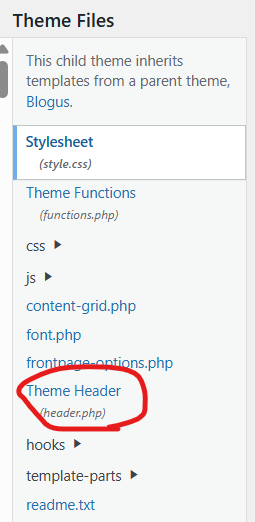
- Navigate to:Appearance → Theme File Editor
- In the list of theme files, open:
header.php - Locate the
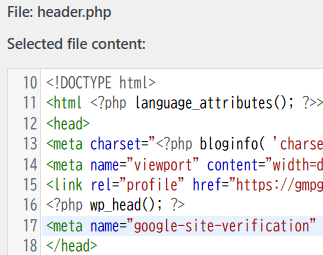
<head>section. It usually looks like this:
<head>
<?php wp_head(); ?>
</head>
- Insert the Google verification meta tag before the
wp_head()function:
<head>
<meta name="google-site-verification" content="XXXXX" />
<?php wp_head(); ?>
</head>
- Click Update File to save the changes.
What this code does
<meta name="google-site-verification" content="XXXXX" />
- This meta tag is provided by Google Search Console.
- When Google’s crawler visits your homepage, it looks for this tag.
- If the tag is present, Google confirms that you control the site and activates Search Console access.
The <?php wp_head(); ?> function is a WordPress hook that loads scripts, styles, and metadata required by WordPress and plugins. Your verification tag must appear before this function or anywhere inside the <head> section.
Final step
After saving the file:
- Go back to Google Search Console.
- Click Verify.
If Google can detect the meta tag on your homepage, the site will be verified.